
Welcome to the PStill home page!
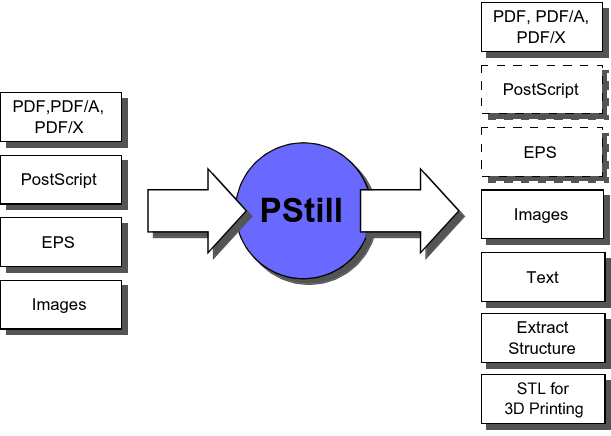
PStill converts PDF, PostScript, EPS, TIFF, JPEG, PNG, BMP and GIF files to PDF, PDF/A and PDF/X, image file formats, STL format for 3D printing and optional generate pre-press ready EPS and PS files. It can do color space conversions including Device link support for all conversions. It provide a uniform and easy to use import interface to parse all supported file formats and extract text, vector, image and AI data (DLL extract also geo information). On Windows it can be used as direct To-PDF and image printer server, producing PDF, image files or STL directly from any application - local or by serving other systems as print clients over the local network.Windows users may want to go to the PStill/Win page directly.

- PStill64 1.94.10 for Windows and 1.92.24 for Linux.
Easy and high-quality EPS, PS, PDF and several raster image formats to PDF conversion on Windows and MacOS X, able to concat multiple files of all types in the output, also as mixed set. You can just drop in some PS, PDF and e.g. JPEG files and PStill will create one PDF from the input set. PStill generate also PDF/X-1a and PDF/X-3, a focused subset of PDF for 'pre-press' work. PStill knows about CMYK and spot colors, handles overprinting and can convert colorspaces. PStill also creates PDF/A-1b, a special version of PDF for archiving purposes and can change the PDF compatibility level (e.g. convert PDF-1.7 to PDF-1.3).
Your PDF cannot be printed on some printers or processed with some applications? PStill does sanitize, simplify, reprocess, flatten transparency and recompress PDF-Files, this process also known as 'transcoding' create a new PDF that has better compatibility, is often smaller in file size, can be optional encrypted/secured and contain only a uniform set of font types. Fonts can be normalized to plain PostScript Type 1 formats, can be subsetted, missing fonts included and bad fonts repaired/replaced. PStill can detect and remove duplicate elements in the PDF. Text can be converted to outlines which makes it perfect for creating 'fontless' PDF. Transcoding can be used to repair bad PDF or simplify the PDF structure so more limited output devices can process it.
PStill also run as command line program and can be easily scripted (BAT, Shellscript, PERL, VB, etc.). The command line converter runs on Windows, Linux, Sun Solaris, IBM AIX, HP HPUX and allows you to integrate PStill into any application that is able to call external programs to get full PDF generating functionality.
PStill can render all supported source formats to images. For PNG RGB plus alpha channel is generated, JPEG renders to RGB, TIFF to RGB and CMYK.
Easily convert a PS or PDF to a set of EPS (incl. EPS TIFF preview generation on the Windows platform) or PostScript. The conversion does retain vectors and text, can handle Gray, RGB, CMYK, spot colors, overprinting, transparency and writes DSC conforming, flattened PostScript output. PStill works as a job 'normalizer' rewriting an existing EPS, PostScript or PDF file by breaking it down to its basic drawing operations but still maintains the same print output. Flattened PostScript can be processed on most any output device as it contains only a handful well defined operations and maintains a normalized coordinate system. Requires PS/EPS Normalizer license type, please see licensing options
In a process called N-Up processing PStill can 'place' and/or rescale pages in the output so the result are e.g. 2 job pages on 1 output page, 4 job pages on 1 output page or any other combinations (assembly is fully scriptable) - to save space or to create booklets. PStill can tile a large page to smaller pages with automatic bleed and cut marks, e.g. for output of posters and construction plans on standard desktop printers. PStill allows to impose several page or parts of pages on each other, add static and dynamic page elements like visual page numbers, barcodes, Javascripts or impose ('stamp') logos. PStill can encrypt PDFs and apply PDF document permissions.
A special option to autoconvert pre-separated PostScript jobs to composite color PDFs or PostScript/EPS files is available (SeparationToComposite module optional, can be ordered separately).
Your printer cannot print the PDF or PostScript you feed to it? PStill can simplify the job so it becomes printable to limited output devices. PStill can auto convert TrueType or unwrap CID or Type 0 fonts to PostScript Type 1 fonts thus greatly enhancing compatibility of the PDF/PS or EPS results. It can autoreplace DVIPS (TeX) embedded bitmap fonts in PS input by its Type 1 variants leading to better and leaner output.
PStill can convert all supported source file types to 3D printable STL, including direct PDF to STL conversion. See the tutorial for a description of the process.
PStill is an appication that runs on your computer directly, not a web service. It does not send out data to servers in the Internet, but performs all conversion tasks locally.
Using the structured output option PStill can make graphic file formats easily parsable to other applications. This mode also allows for automatic path clipping and conversion of text and lines to fill paths. Please follow this link here for more information. PStillDLL also allows for direct import by an easy callback interface.
PStill can be setup'd to run as virtual print server, even accepting jobs over the local network - you can just print from your Windows application using the standard printer driver and PStill gets and converts the print job in the background to PDF. This feature works even over your local network without paying 'per client' or the need to install the software on the client systems. You only need to install PStill on the server in your LAN. The virtual print server can also receive jobs from Linux, UNIX or MacOSX based systems or sent from other Windows systems from scripts directly.
PStill is also available as DLL to help you integrate PDF transcoding, PDF/EPS/PS parsing, EPS and PS to PDF conversion, prepress quality EPS and PS creation from PDF and more into your application. The DLL has the same abilities as the program version. PStill DLL is fully self contained and does not rely on external third party programs or libraries. Please contact me for details.
Please download the software and try it out first, so you can be sure it works for you. Then please check the following links:
Questions regarding the licensing options? Send me an email.
See this information about the license options.
Please note the MacOS X version of PStill uses a different version numbering scheme.
| Platform | Version | Release | Get it here |
|---|---|---|---|
| MS Windows | Windows GUI | 12/24 | PStill/Win page |
| Linux/x64 | Command line | 12/24 | 1.92.24 Compatibility notes |
| FreeBSD 11+ | Command line | 08/22 | 1.90.32 |
 | | | |
| Old versions (end of life, unsupported): | | | |
| Linux/x64 | Command line | 10/19 | 1.90.08 |
| Linux/Ia32 | Command line | 10/19 | 1.90.08 Compatibility notes |
| Linux/RasperryPi | Command line | 05/15 | 1.84.34 |
| | | |
| Ancient versions (end of life, unsupported): | | | |
| Sun Solaris/Sparc | Command line | 02/09 | 1.72.18 1.72.12 1.72.14 |
| IBM AIX 4.3+ | Command line | 03/07 | 1.72.12 |
| HP HPUX/Itanium | Command line | 03/07 | 1.72.12 |
| HP HPUX/PPA | Command line | 05/06 | 1.70.1 1.72.7 |
| | | |
| SGI IRIX 6.x | Command line | 12/01 | 1.51.3 1.55.7 |

 Terms of use, please read before downloading
To find out how to order a license key click here.
By registering the software you are actively helping and funding further development. Contary to anonymous large companies you are talking directly to the developer and I also listen to user requests for potential future additions to PStill.
Some information about the general command line usage of PStill can be found here. The PStill FAQ can be found here.
Without key the Windows version will write a small 'mark' on the each page but is otherwise fully functional so you can test the software before purchasing a license key.
The PStill archive must not placed on another web page, ftp server or CDROM collection (or stored any other media) without written consent. Of course you may put a link to this page on your web site.
If you like to use the pstill conversion engine in your own products or software packages, inquire the prices for volume/site licenses or you have a question just send an email to this email address. My full contact information can be found here.
(In German: So können Sie mich erreichen: hier klicken).
Other PStill and PDF related information
You may need fonts to operate PStill, for some freely available ones please consult the free fonts page and the Type 1 information page maintained by Nelson Beebe. All versions of PStill accept PostScript Type 1 or Type 3 fonts in either PFA or PFB file format, starting with version 1.60 PStill will also accept TTF (TrueType) fonts.
To get the free Acrobat Reader from Adobe, Inc. just follow this link:
Do you have other needs or questions? Fast raster image to PDF conversion, DCS to PDF or EPS conversion, PDF marking, preflight/analysing systems, PostScript/PDF color separation, color control, PDF printing libraries, job proofing and general raster image/PS/EPS/PDF conversion and meta extraction technology (e.g. DCSTOPDF, DCSTOEPS, IPTCINFO/XMP extraction) are also in my portfolio. To name some:
- PDFtoStruct/Extract - Automatically extract pages from PDF based on content analysis with intelligent auto-renaming of the extracted sets.
- JT2EPS - JPEG and TIFF to EPS converter with full support of takeover of Photoshop(R) meta information, compression, color profiles, clip paths and EPS preview generation.
- DCS2PDF - converts a Photoshop(R) DCS to PDF while retaining all native spot colors
- PDFPlace - PDF multi-page layout, compose a new PDF from single PDF pages
- PDFCheck - PDF structure analysis and preflight tool
- PSCheck - PS/EPS structure analysis and preflight tool
- RaStill - fast TIFF to PDF converter
- PT2Barcode - reads Code 39 barcodes from TIFF and PDF files returning the bar code in text form
- PDF-Marker - fast PDF stamping tool, for removeable and changeable stamps (Stamping by reprocessing is part of PStills functionality)
- PDFPostermaker - images a small pagesize PDF on several pages, incl. cutmarks and bleed generation (now part of PStill)
- PDFSeparator - color separates a PDF to a set of PDF, each in a primary color (functionality now part of PStill)
- X-PDFBrowser - Embed files and data into PDF, optional encrypted.
- DropResizer - Easy to use image resize & sharpening, renaming and format conversion in one step.
I also offer consulting and custom system analysis/design. Please contact me for more information.

 Disclaimer
ON DOWNLOADING THE PSTILL PROGRAM YOU INDICATE ACCEPTANCE TO THIS DISCLAIMER. YOU ARE USING PSTILL ENTIRELY AT YOUR OWN RISK. THE AUTHOR IS NOT RESPONSIBLE FOR ANY PROBLEMS, LOSS OR DAMAGE THIS PROGRAM, ITS USE OR MISUSE OR RESULTS MAY CAUSE OR INFLICT. ALL NAMES AND SYMBOLS ARE USED FOR IDENTIFICATION PURPOSE ONLY. PSTILL IS A REGISTERED WORDMARK OF FRANK SIEGERT. POSTSCRIPT, ADOBE, ACROBAT, DISTILLER, PHOTOSHOP, PDF AND OTHERS NOT MENTIONED HERE ARE TRADEMARKS OR REGISTERED TRADEMARKS OF ADOBE SYSTEMS INCORPORATED. SUN, SPARC, SOLARIS AND OTHERS ARE TRADEMARKS OR REGISTERED TRADEMARKS OF SUN INC. HP, HPUX AND OTHERS ARE TRADEMARKS OR REGISTERED TRADEMARKS OF HEWLETT PACKARD INC. AIX IS A REGISTERED TRADEMARK OF IBM INC. WINDOWS IS A REGISTERED TRADEMARK OF MICROSOFT, INC. UNIX IS A REGISTERED TRADEMARK OF THE OPEN GROUP. LINUX IS A REGISTERED TRADEMARK OF LINUS TORVALDS. ALL OTHER BRAND OR PRODUCT NAMES MENTIONED ON THIS PAGE, IN THE IDENTIFICATION PRINT OUT OF THE SOFTWARE OR ITS DOCUMENTATION ARE THE TRADEMARKS OR REGISTERED TRADEMARKS OF THEIR RESPECTIVE HOLDERS. PDF AND PDF LIST OF OPERATORS AND DATA STRUCTURES ARE COPYRIGHT ADOBE SYSTEMS INCORPORATED. PSTILL WAS WRITTEN ACCORDING TO THE COPYRIGHT STATEMENT AS OUTLINED IN THE ADOBE PORTABLE DOCUMENT FORMAT REFERENCE MANUAL VERSION 1.2, PAGE 22/23. THIS WEB PAGE CONTAINS LINKS TO THIRD PARTY WEB SITES WHICH ARE NOT UNDER CONTROL OF FRANK SIEGERT. THESE LINKS ARE ONLY PROVIDED FOR CONVENIENCE AND THE INCLUSION OF THESE LINKS DOES NOT IMPLY ANY RESPONSIBILITY FOR THE CONTENTS ON THESE SITES. THIS WEBSITE AND ITS CONTENT ARE LOCATED IN GERMANY. THIS WEB SITE DOES NOT USE COOKIES OR STORE ANY PERSONAL INFORMATION. CLICK HERE FOR CONTACT INFORMATION.
Data Protection Statement / Datenschutzerklärung